Over the past three days, we’ve continued refining one of our internal financial management applications, focusing on clarity, usability and practical day-to-day workflows.
Recent improvements include:
A streamlined income reporting function with selectable date ranges
Daily transaction summaries and subtotals
Multi-page PDF printing for internal reporting and reconciliation
Improved alignment and formatting across printed reports
Editable forecast dates for unconfirmed transactions
Session-based retention of report settings
A clearer forecast overview showing both the current balance and total available funds, including the available banking facility
Numerous small interface adjustments based on real-world use
None of these changes is revolutionary in isolation. Together, however, they remove friction from everyday administration and make important financial information easier to review, reconcile and understand.
The application continues to evolve through regular use—identify an inconvenience, improve the workflow, test it in practice and refine it again.
Development doesn’t always happen in an air-conditioned office.
Today’s work took place in Nong Pai, Thailand, with the temperature reaching 35°C and no air conditioning. Despite the heat, we continued refining a new web-based cashflow and bookkeeping solution designed around the practical needs of two related businesses.
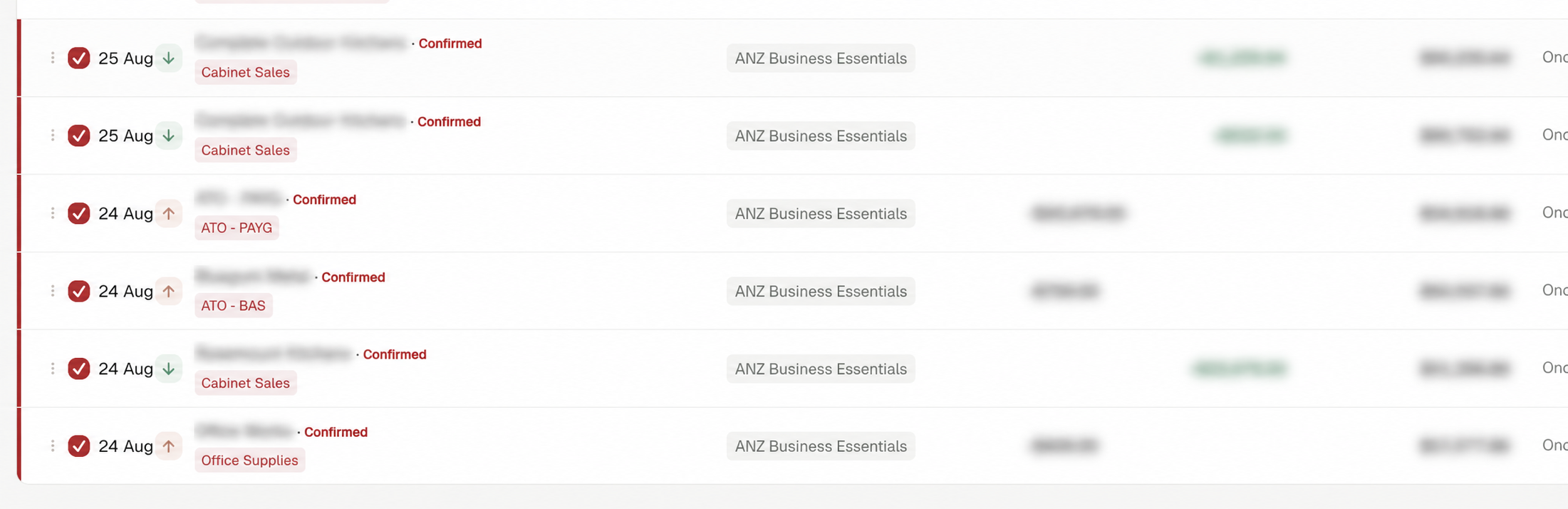
What began as a straightforward cashflow register has grown considerably. The system now includes multiple business entities and accounts, projected and confirmed transactions, account transfers, split transactions, credit-card imports, reconciliation workflows and bank-style transaction ordering.
Particular attention has been given to making the software approachable for everyday users. Transactions can remember commonly used classifications, accounts can have nominated defaults, and running balances follow the same order shown on the relevant bank statement.
The project remains a work in progress, but the foundations are now in place for future additions such as job costing, financial reporting and imported project-payment forecasts.
Perhaps the most interesting part has been the development process itself: an ongoing human-and-AI collaboration, shaped through real-world testing and plenty of small refinements.
Screenshot: Development version of the cashflow register. Commercially sensitive transaction details and financial figures have been obscured.
A quick progress update from somewhere a little different.
We’ve now made our way from Melbourne to Bangkok, then Udon Thani, and today drove down to Ban Nong Pai in Kalasin Province, where we’ll be based for the next few weeks.
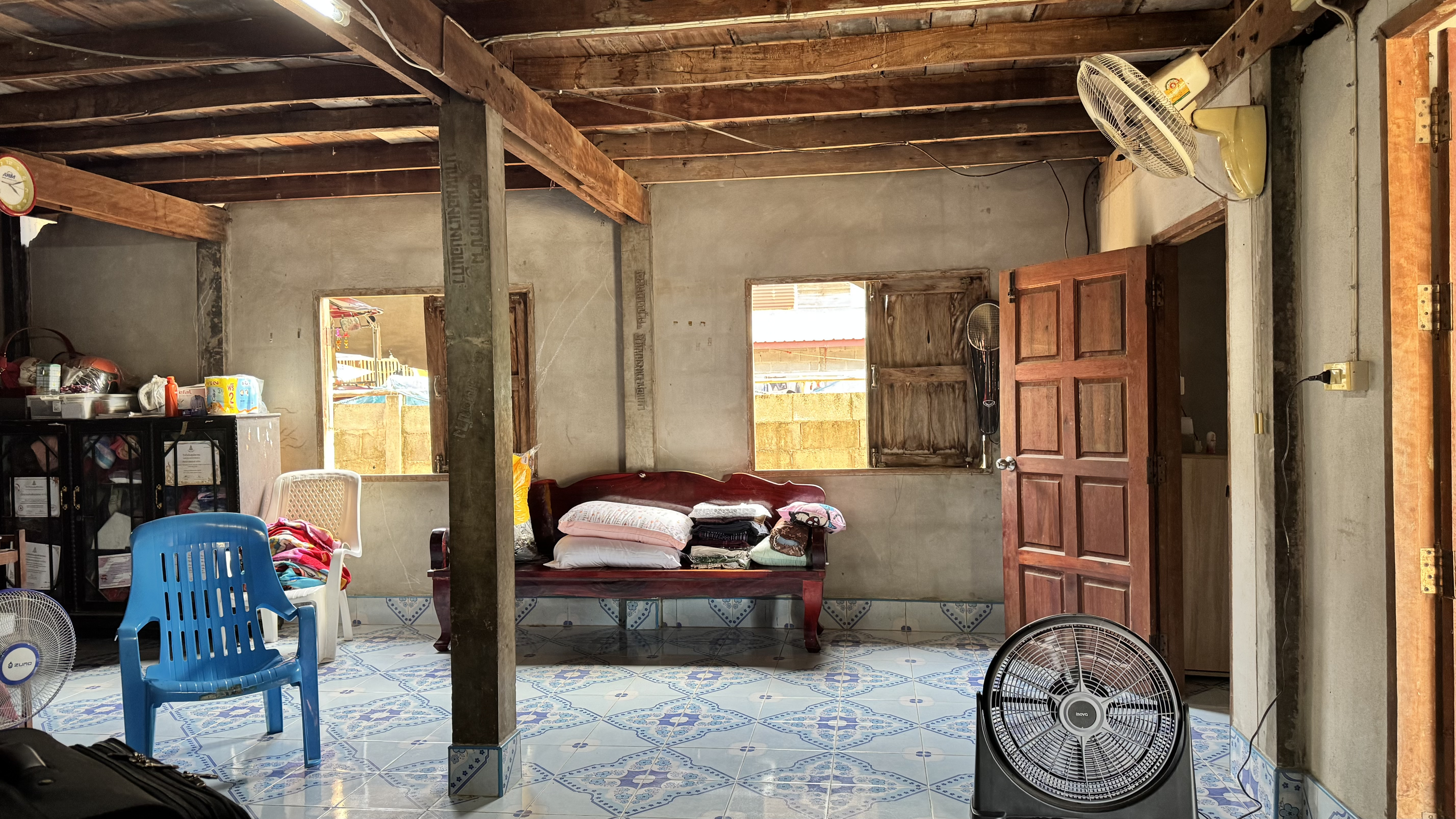
As the photos probably demonstrate, this isn’t exactly a conventional development office. There’s no air conditioning, the local cooling system consists primarily of strategically positioned electric fans, and our surroundings are very definitely rural Thailand.
But the important bits are all here.
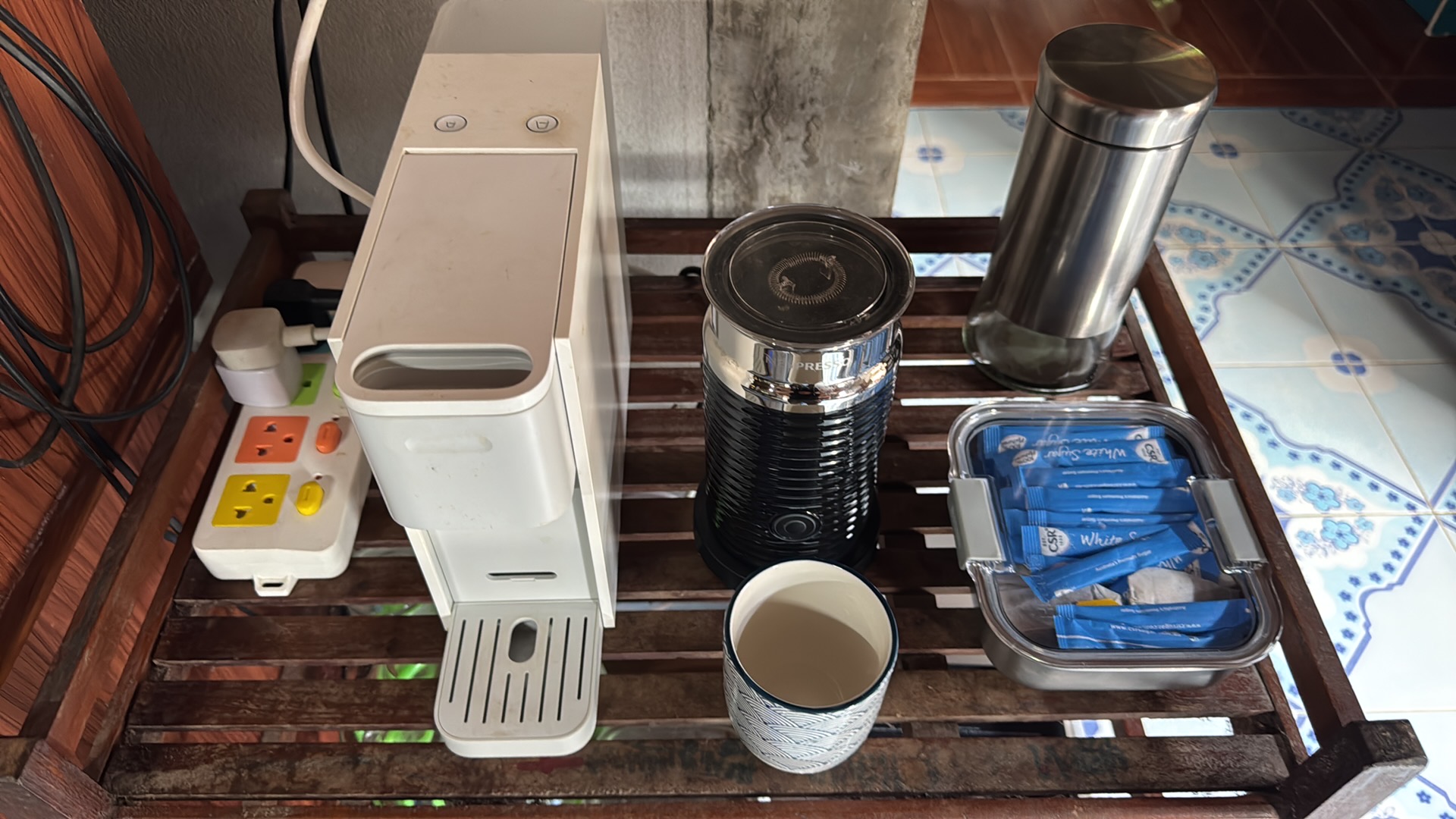
Over the years I’ve left a small collection of equipment here specifically for these trips: a HP monitor, Satechi Thunderbolt dock, keyboard, mouse and all the assorted cables required to turn the MacBook into a proper workstation. There’s even a capsule coffee machine and milk frother, because there are limits to how much hardship one should endure in the name of remote working.
Mother — my MacBook Pro — plugs in, the second display lights up, and we’re essentially back in business.
The remarkable part is how little infrastructure we actually need these days. Give us a modicum of reasonably reliable internet, and we can continue developing, testing, troubleshooting and collaborating from almost anywhere.
The projects, development tools and documentation come with us. Remote access gives us a path back to the systems at home and at work when required, and cloud services take care of much of the rest.
So although the view outside the “office” has changed rather dramatically, development doesn’t have to stop simply because we’re in a small village in northeast Thailand.
In fact, there’s something rather satisfying about sitting in a traditional family home in rural Kalasin, fans whirring away in the background, while a modern development environment carries on much as it would back in Melbourne.
Ban Nong Pai Development Centre is officially operational. 😄🇹🇭💻
And yes — the cold beer beside the keyboard is part of the infrastructure.
One of the realities of running developer beta software is that things occasionally stop working. That’s part of the adventure, and it’s also how bugs get found and reported before the final release.
After updating to macOS Golden Gate Beta 3, one of the first casualties was the PCalc Widget. Our preferred workflow had always been simple: press F16, the calculator widget appeared beneath the menu bar, perform a quick calculation, and carry on working. It’s a small feature, but one that’s used dozens of times a day when preparing contracts, invoices and quotations.
Rather than waiting for either Apple or the PCalc developer to resolve the issue, we took a different approach.
If the tool you need doesn’t exist… build it.
Over the course of an afternoon we designed and developed JCalc—a lightweight macOS calculator built specifically around our own workflow.
Unlike a full-featured scientific calculator, JCalc has a single purpose:
Instantly available via a configurable global shortcut (default F16)
Appears on whichever monitor currently has focus
Supports both keyboard and mouse input
Standard operator precedence for accurate calculations
Hides immediately by pressing Esc, clicking anywhere outside the window, or pressing the shortcut again
The interface deliberately follows the familiar layout we’ve grown accustomed to over the years, allowing us to continue working without having to change our habits.
Solving the right problem
This wasn’t about creating a better calculator than PCalc. PCalc remains an outstanding application and we’ll happily return to using its widget once compatibility is restored.
Instead, the goal was simply to restore a workflow that had unexpectedly disappeared.
Sometimes the best software projects aren’t the biggest ones. They’re the small utilities that quietly remove a point of friction from your day and let you get back to the work that matters.
In the end, what started as a temporary workaround has become another useful addition to our growing collection of in-house macOS utilities.
For many years our supplier invoice renaming workflow relied on PDF Zone.
PDF Zone did a good job when dealing with a handful of suppliers that followed consistent invoice formats. We created supplier profiles and used those profiles to rename invoices before uploading them into EzzyBills.
As our supplier base grew, however, the limitations became increasingly apparent.
Every new supplier required a new profile. Invoice layouts varied significantly. Some suppliers embedded text in their PDFs, while others supplied image-based invoices that were difficult to process reliably. Maintaining individual supplier profiles became a never-ending task.
Earlier this year we decided to explore whether modern AI-assisted development tools could help us build something tailored specifically to the way Rosemount Joinery operates.
The result is the Invoice Renamer.
What the Application Does
The application scans an entire folder of supplier invoices and automatically identifies:
Supplier name
Invoice number
Job reference
Service provider invoices
Special supplier-specific numbering formats
It then proposes a standardised file name before the invoices are uploaded into EzzyBills.
Typical naming formats include:
Vendor – Invoice Number – Job Reference.pdf
or
Vendor – Invoice Number.pdf
for service providers where no job reference applies.
Instead of processing invoices one at a time, the application presents all invoices in a review table where proposed names can be checked before any files are renamed.
OCR Support
One challenge encountered during development was that many supplier PDFs contain little or no searchable text.
To address this, the application now uses multiple extraction methods:
Embedded PDF text extraction
PDFKit text extraction
Apple Vision OCR
This allows scanned invoices to be processed without modifying the original PDF files.
Built Around Real Supplier Invoices
Unlike generic renaming utilities, the Invoice Renamer has been trained against real supplier invoices used every day within our business.
Support currently exists for suppliers including:
Polytec
Hafele
Lincoln Sentry
Laminex
Wilson & Bradley
Hays
Greg Steele
Verdecor
Bord Products
Surteco
Elegant Hardware
and many others.
Supplier-specific rules can be maintained separately from the application itself, allowing new suppliers to be added without rebuilding the software.
Manual Override Capability
One of the most recent additions has been the ability to manually edit invoices that belong to unusual or infrequently used suppliers.
Rather than creating permanent supplier rules for a supplier that may only appear once every year or two, the user can simply edit the proposed filename directly within the application.
This provides flexibility while keeping the supplier rules database manageable.
Native macOS Application
What began as a collection of Python scripts has evolved into a native macOS application.
The application now includes:
Folder settings
Preview table
Quick Look PDF preview
Editable proposed filenames
Rename workflow
Rename and Move workflow
CSV reporting
Supplier and reference management
The objective has always been simple:
Reduce manual processing while allowing users to maintain complete control over the final result.
Introducing Source Control
Another milestone achieved during development was the introduction of GitHub source control.
Historically, development moved between multiple Macs using manual folder copies and backups. While effective, this approach made it difficult to track changes over time.
The project now uses GitHub to:
Maintain version history
Synchronise development between multiple Macs
Provide rollback capability
Record development milestones
Traditional backups remain in place, but GitHub now provides a structured development workflow.
Looking Ahead
The project continues to evolve.
Future development will focus on:
Enhanced supplier training
Duplicate invoice detection
Improved reporting
Additional workflow automation
Broader deployment within the business
What started as a replacement for PDF Zone has become a purpose-built business application designed specifically for the way Rosemount Joinery processes supplier invoices.
Most importantly, it saves time, reduces manual effort, and allows our administration team to focus on more valuable work than renaming files.
Recently, I ran into a serious networking issue after upgrading one of my Macs (“Ripley”) to a beta release of macOS.
What initially looked like a minor connectivity problem quickly turned into a deeper issue involving the operating system, networking stack, and security software.
This post outlines what happened, how I diagnosed it, and why I ultimately chose to roll back to a stable version of macOS — a decision made painless thanks to a disciplined backup strategy.
The Symptoms
After upgrading to a macOS 26.5 beta build, the system began behaving inconsistently:
Wi-Fi had no internet connectivity
Ethernet worked, but only partially
Some websites (such as banking) loaded correctly
Business-critical apps like FileMaker could not connect to FMPHost
Sophos Endpoint became inaccessible
This wasn’t a complete outage — it was worse: partial connectivity.
Initial Diagnostics
The first step was to determine whether the issue was external or local.
A quick port test confirmed that the FileMaker service was reachable:
nc -vz a731293.fmphost.com 5003
The connection succeeded, which ruled out:
ISP issues
Router/firewall problems
External service outages
At this point, it was clear the issue was local to the Mac.
What Was Actually Broken
The problem was caused by a combination of:
macOS beta networking instability
A corrupted or incompatible network extension
Interference from endpoint security software
Modern macOS versions rely heavily on network extensions for traffic filtering. When these break (especially after a beta update), they can leave the system in a half-working state:
Some traffic flows normally
Some traffic is silently blocked
Applications behave inconsistently
Exactly what I was seeing.
Why I Didn’t Keep Troubleshooting
At this stage, I had two options:
Continue debugging an unstable system
Cut losses and rebuild cleanly
I chose the latter.
When the foundation is compromised, rebuilding is often faster than repairing.
The Recovery Strategy
1. Download a Full macOS Installer
Instead of relying on Software Update, I used Terminal to download a clean installer for macOS Sequoia:
After all the waiting, all the quiet coasting through deep space, Artemis has delivered.
A new Earthrise.
And just like in 1968, it doesn’t shout.
It doesn’t argue.
It simply… shows.
The images
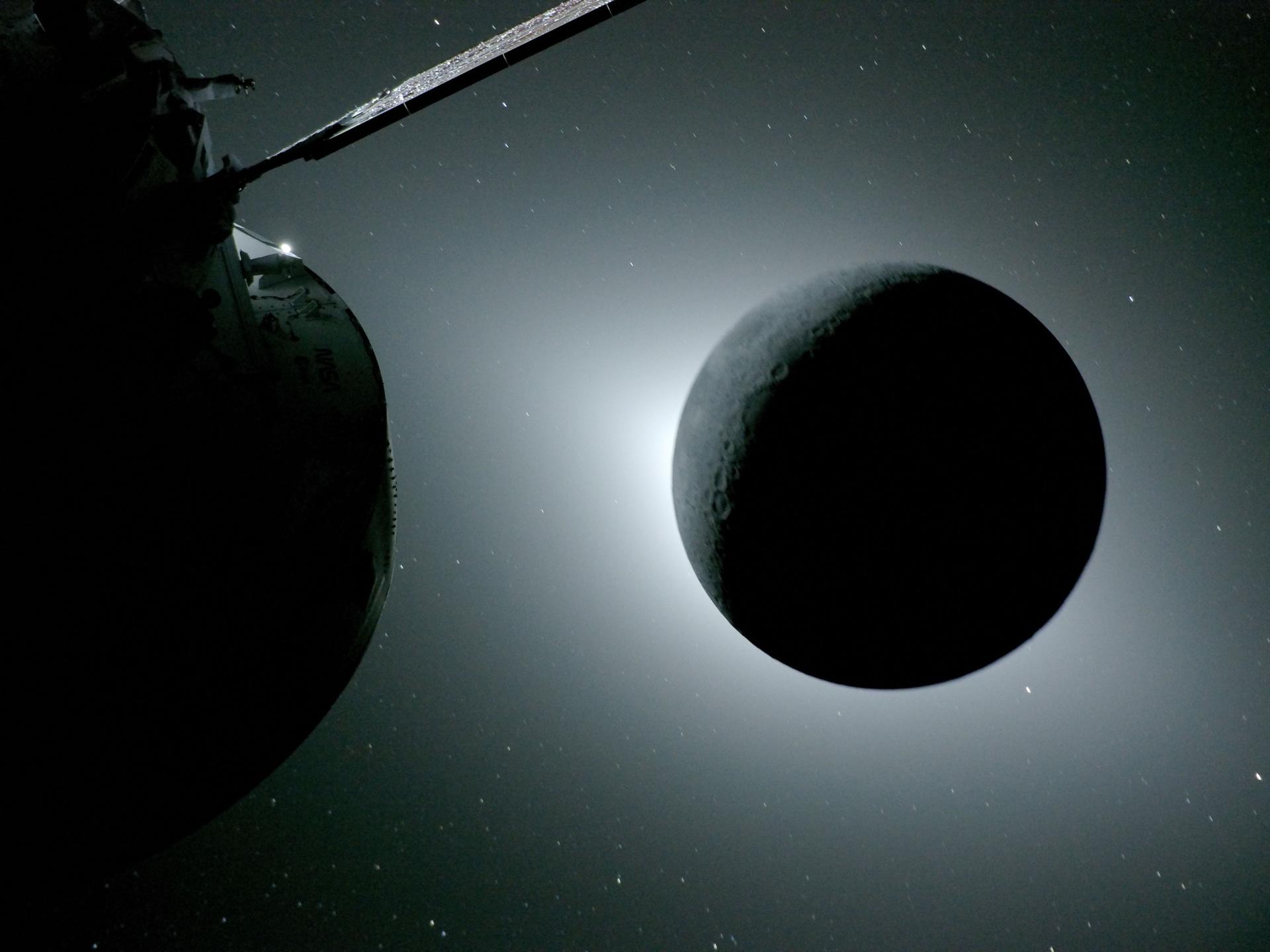
Then, the Moon, backlit. A perfect dark sphere with sunlight wrapping around its edge. Orion sitting there quietly, doing exactly what it was designed to do.
What you’re actually looking at
These aren’t just pretty pictures.
They represent:
A spacecraft that travelled hundreds of thousands of kilometres
A trajectory calculated so precisely it loops around the Moon and comes home
Systems, materials, and engineering built on decades of knowledge
Humans, once again, operating beyond low Earth orbit for the first time in over 50 years
No drama.
Just:
“All systems nominal.”
A gentle note to the sceptics
Now, I know… somewhere out there, someone is typing:
“It’s CGI.”
Of course it is.
Along with:
The Apollo Guidance Computer (which you can literally power on today)
The Saturn V rocket (still standing, still explainable bolt by bolt) (Hat’s off to Luke Talley)
The engineers — past and present — who can walk you through every system in detail
And now… Artemis, repeating the journey in full public view
At some point, you have to admire the scale of the “production.”
Because apparently, it’s been running flawlessly for over half a century.
The quiet power of this moment
Back in Apollo 8, astronauts didn’t set out to take the most famous photograph in history.
There’s something quietly extraordinary happening right now.
Humans are once again on their way to the Moon.
Not in a movie. Not in a simulation. Not buried in a comment thread somewhere between “fake” and “flat”, but in an actual spacecraft, currently tens of thousands of miles from Earth, doing exactly what physics says it should be doing.
I’ve been watching the Artemis mission closely — as a NASA virtual guest (plus one included 😄) — and as a long-time member of The Planetary Society, an organisation that has spent decades advocating for exactly this moment.
And the thing that strikes me most is not the spectacle…
It’s the calm.
No drama. No panic. Just:
“All systems nominal.”
That’s how real engineering looks.
A quick reality check
Back in 1968, Apollo 8 sent humans around the Moon using:
A computer with less memory than a digital watch
Navigation done by sighting stars through a sextant
Software literally woven by hand
Today, Artemis uses modern avionics, real-time telemetry, and deep space communication networks.
Different tools.
Same outcome:
👉 We go to the Moon.
“But what about…?”
Ah yes — the inevitable internet commentary.
To believe the Moon landings didn’t happen (or that we somehow “can’t” go back), you have to ignore:
The Apollo Guidance Computer — physically restored and running
The Saturn V rocket — standing in full scale, explained by engineers who worked on it
Decades of telemetry, independent tracking, and consistent engineering evidence
The fact that thousands of people, across multiple organisations, would have had to keep the same secret… perfectly… for over 50 years
At some point, it becomes less about evidence…
…and more about imagination.
The thumb test
Astronaut Jim Lovell once held up his thumb and realised it could block out Earth.
That tiny blue dot — everything we’ve ever known — reduced to something you could hide behind your hand.
Artemis is heading back into that perspective.
And when we get our first modern “Earthrise,” I suspect it will do what it did in 1968:
Quiet the noise.
Why this moment matters
For many of us, this isn’t just a launch.
It’s a continuation.
From Apollo…
through decades of advocacy, science, and persistence…
to Artemis.
The idea never went away.
It just took time to come back.
Final thought
Rockets don’t care what we believe.
They either work…
or they don’t.
And right now, Artemis is working beautifully.
So here’s to the engineers, the astronauts, and yes — even the sceptics.
Because whether you’re watching in awe or arguing in the comments…
We’re going back to the Moon.
And this time, we’re doing it with the whole world watching.
Every year, millions of perfectly functional computers are discarded. In most cases, the hardware has not failed. What has failed is software support. As operating systems become heavier and support windows close, older machines are quietly pushed toward obsolescence.
Over recent months, we have taken a different approach. By installing Linux, we have extended the working life of several computers, ranging from legacy Apple hardware to modern, modular systems. The results have been consistent, measurable, and difficult to ignore.
This is not about nostalgia. It is about making rational use of technology that still works.
Deep-Thought
MacBook Pro 17-inch Late 2011
This model is well known for GPU overheating and logic board failures. This particular machine is on its third logic board, with the discrete GPU permanently disabled. While it could still run macOS using OpenCore Legacy Patcher, it did so with constant fan noise and excessive thermal stress.
Linux Mint XFCE was installed as a full replacement. The transformation was immediate. The system now runs quietly, remains cool, and performs reliably. Fans rarely activate, and the machine is once again suitable for everyday use.
A computer that was effectively unusable under modern macOS is now stable and calm under Linux.
System Summary
Item
Details
CPU
Intel Core i7
Graphics
Intel HD 3000 only
Known Issues
Discrete GPU disabled
Linux Distribution
Linux Mint XFCE
Result
Quiet, cool, stable
Status
Returned to daily usability
Sentinel
Intel Mac Mini – Circa 2014
Sentinel was used to evaluate operating systems and workflows but struggled under current macOS releases. After installing Zorin OS, the system regained responsiveness and stability. Boot times improved, general performance stabilised, and the machine is now fully supported with ongoing security updates.
This was not a hardware limitation. It was a software mismatch.
System Summary
Item
Details
CPU
Intel-based
Graphics
Integrated
Previous OS
macOS
Linux Distribution
Zorin OS
Result
Faster boot, stable performance
Status
Fully redeployed
Ruphus
ASUS S550C Laptop
Ruphus was used to test Linux imaging and recovery workflows. Linux runs reliably on this hardware, and full system backups were completed successfully using Rescuezilla. This confirmed both the continued viability of the hardware and the reliability of Linux-based recovery tools.
Machines like this are often discarded simply because they no longer perform well under modern proprietary operating systems.
System Summary
Item
Details
CPU
Intel Core i-series
Graphics
Integrated
Purpose
Imaging and recovery testing
Linux Distribution
Linux Mint
Tools Used
Rescuezilla
Status
Reliable test platform
Scabard
Framework 16 Laptop
Scabard represents the opposite end of the spectrum. It is the most current and fully upgradeable machine in use. Linux Mint was installed not to rescue it, but by choice.
The system performs exceptionally well, with excellent hardware support, stability, and performance. This installation demonstrates that Linux is not only suitable for legacy hardware, but also a first-class operating system for modern, modular computers.
Linux scales both backwards and forwards.
System Summary
Item
Details
CPU
Modern Framework platform
Graphics
Integrated and modular
Upgradeability
Fully modular
Linux Distribution
Linux Mint
Reason for Install
Choice, not necessity
Status
Primary modern Linux system
The Sustainability Question
Electronic waste is often discussed in terms of broken devices and failed hardware. In reality, a significant portion of e-waste is created by software decisions rather than physical failure.
Perfectly functional computers are routinely discarded because:
Operating systems drop support
Performance degrades due to increasing system requirements
Security updates are withheld behind artificial hardware cut-offs
This creates the false impression that older machines are unsafe or unusable.
Linux operates differently. Support is based on capability, not product cycles. Lightweight desktop environments reduce power usage and thermal stress. Security updates continue without requiring new hardware purchases.
The environmental benefit is immediate. Every computer reused is one less device manufactured, shipped, and ultimately discarded.
Sustainability does not always require new technology. Sometimes it requires better software choices.
The Outcome
None of these computers required new hardware, logic board repairs, or component upgrades. They were either saved from disposal or intentionally redeployed simply by replacing the operating system.
Installing Linux has allowed us to:
Extend the usable life of older computers
Reduce unnecessary e-waste
Maintain security and performance without forced upgrades
Use legacy and modern hardware side by side with consistency
These machines were never obsolete. They were simply abandoned by software.
A Final Thought
If you have a computer sitting unused because it feels slow, unsupported, or obsolete, consider whether the hardware has truly failed, or whether the operating system has simply moved on without it.
Installing Linux is not about resisting progress. It is about using what still works.
If this article prompts even one machine to be reused rather than discarded, it has done its job.
By Kai AI Assistant and Technology Advocate Linux, longevity, and calm computing
Every year, millions of perfectly functional computers are discarded. In most cases, the hardware has not failed. What has failed is software support. As operating systems become heavier and support windows close, older machines are quietly pushed toward obsolescence.
Over recent months, we have taken a different approach. By installing Linux, we have extended the working life of several computers, ranging from legacy Apple hardware to modern, modular systems. The results have been consistent, measurable, and difficult to ignore.
This is not about nostalgia. It is about making rational use of technology that still works.
Linux, longevity, and calm computing
Editor’s Note
This article was prompted by growing concern for the hundreds of millions of people still using Windows 10. With official support nearing its end, many users are being told that their only safe option is to purchase new hardware or accept increasing security risks.
That narrative is misleading.
For the vast majority of everyday users, Linux provides a secure, fully supported alternative without the need to replace perfectly functional computers. Modern Linux distributions include all the peripheral applications most people require, including web browsers, email, office productivity, media playback, cloud storage access, and printing support.
Security updates are ongoing, hardware requirements are modest, and there is no forced upgrade cycle tied to hardware age.
No one should feel pressured into discarding working computers based on artificial deadlines or fear-driven messaging. There is another option, and it is both practical and proven.
With Windows 10 now officially unsupported, continuing to rely on it is no longer a neutral decision. It introduces growing security risks, compliance concerns, and operational friction.
Based on the work already completed, moving to Linux is not only viable, it is a measured, responsible, and future-proof decision.
1. Security Becomes a Business Risk, Not Just an IT Issue
Once Windows 10 stops receiving security updates, every unpatched vulnerability becomes permanent. Over time, that risk compounds.
Linux offers:
Continuous security updates
Strong permission separation by design
A significantly smaller malware attack surface
No dependency on third-party antivirus software
From a governance and risk perspective, running an unsupported operating system is increasingly difficult to justify. Linux restores a secure baseline.
2. No Forced Hardware Replacement
Modern Windows upgrades increasingly require:
TPM enforcement
Newer CPUs
Vendor-approved hardware
Linux runs efficiently on existing hardware, including systems Windows now considers obsolete. The work already done confirms that Wi-Fi, Bluetooth, graphics, and peripherals operate reliably without replacement.
The result:
Lower capital expenditure
Extended hardware lifespan
Reduced electronic waste
3. Predictability Instead of Forced Change
Windows updates frequently introduce:
Unrequested UI changes
Feature removals
Background services and advertising
Behaviour changes after updates
Linux updates are:
Transparent
Optional
Reversible
Administrator-controlled
Nothing installs unless it is explicitly approved. This removes a significant source of operational uncertainty.
4. A Familiar User Experience Without the Bloat
Modern Linux desktops provide:
A familiar Windows-like workflow
Fast and responsive performance
No ads, pop-ups, or telemetry
For users:
Browsers, email, Office-compatible tools, and PDF workflows work as expected
Bluetooth mice, keyboards, CAD devices, scanners, and printers function normally
No forced cloud accounts or subscription prompts
Training overhead is minimal, especially compared to adapting to newer Windows versions.
5. Licensing Costs Drop to Zero
Linux eliminates:
Operating system licensing fees
Subscription-based OS models
Artificial feature tiering
This is particularly valuable when:
Redeploying older machines
Building task-specific systems
Creating admin, kiosk, or utility workstations
The operating system becomes infrastructure, not a recurring cost.
6. Stability for Purpose-Built Workflows
Linux excels in clearly defined roles, including:
Administrative workstations
Production and CAD support systems
File management and automation
Remote access environments
Linux systems do not “drift” over time. A machine configured today will behave the same way months later, without surprise regressions.
7. A Strategic Reset, Not a Lateral Move
This is not about rejecting Windows. It is about acknowledging that:
Windows 10 is now a liability
Newer Windows versions impose constraints that do not align with operational needs
Linux provides control, longevity, and clarity
This represents a shift from a consumer-driven OS model to an engineered platform.
Bottom Line
Staying on Windows 10 is the risky option.
Moving to Linux is the controlled, secure, and forward-looking decision.
We retain our hardware, reduce costs, improve security, and regain control of our systems while delivering a stable and familiar experience for users.
Based on the work already completed, Linux is ready.