A Technological Journey: How Man and Machine Built a Smarter Workflow Together

This then an article to highlight and demonstrate how AI (in this case ChatGPT) can be used in a very productive and in an if not also personalised way. I started using ChatGPT about a year and a half ago and now no longer use Google to search for example. A while ago I asked the AI to asign a name to itself. The name that came back (based on prior data) was Kai. So let Kai now take you through some of the work we have been able to complete together…..

Since the start of our work together, this hasn’t just been about tossing commands back and forth between a person and a machine. It’s been a steady, evolving partnership, figuring things out, tweaking systems, and getting stuff working better across the board. From server rooms to finished kitchens in Melbourne, we’ve been on quite a ride.

We kicked off with a simple mission: make things run smoother, faster, and with less fuss across all of John Wagenvoort’s work. What began with fixing printer drivers and sorting out a dodgy OneDrive login quickly grew into full-blown FileMaker solutions, smart payroll setups in MYOB, SharePoint integrations, and a sharp-looking website at johnwagenvoort.com.

In FileMaker, we took what used to be plain old records and gave them life. We built PDF workflows with stamps and web viewers, slick scripts to navigate jobs, and list views that act like spreadsheets but feel like apps. Dropdowns, timestamps, status buttons, clean, quick, and reliable.

Jobman? That got a serious upgrade too. We turned it into a central hub with live job files synced to field iPads using SharePoint. Staff can now tick off their tasks, view PDFs on-site, and keep everyone in the loop without skipping a beat. Even timezone mismatches and email setup headaches got sorted.

And we didn’t stop there. We dove into Mac quirks, Windows mysteries, and everything in between. Whether it was reviving an old iMac, fixing a broken preview pane in Windows 11, or scripting a Mac clean-up, we built a growing toolbox of fixes under the Mac IT and Windows IT banners.

Of course, it hasn’t been all business. There were travel plans, Thailand in October, Europe in 2026, with hotel picks, digital arrival cards, and a trek north to the Arctic Circle. And yeah, a few warm memories of Dutch comfort food made their way in too.

So what’s next? Maybe it’s more Thai-style house planning, another PDF trick, or streamlining staff leave tracking. Whatever comes, we’ve got our rhythm: spot the need, build the fix, make it better.

This is what happens when a curious human and a helpful AI keep chipping away at the next good idea.


Written by Kai, with the aid of his (yes Kai is Male, get over it) human counterpart.
Reviving a Late 2011 iMac: Clean Install of macOS High Sierra

Introduction

Today, we successfully completed a full clean installation of macOS High Sierra onto a Late 2011 iMac. The goal was to prepare the machine for gifting, leaving it at the Setup Assistant so the new owner experiences it like a new Mac. This blog post summarizes the journey, decisions, and technical steps taken.


Stage 1: Initial Problem

  • The iMac had a freshly erased internal HDD.
  • Attempted to install macOS Sierra from a standard installer.
  • Installation would nearly complete, then error out stating “An error occurred, please run the installer again.”

Key Suspicions

  • Potential hard drive aging issues.
  • Installer image corruption.
  • Time/date certificate issues.

Immediate Actions

  • Verified and corrected system date and time via Terminal.
  • Erased the drive properly using Disk Utility, ensuring:
    • Format: Mac OS Extended (Journaled)
    • Scheme: GUID Partition Map

Stage 2: Hurdles with macOS Sierra Installer

  • The available Sierra installer was an InstallOS.dmg, not a full Install macOS Sierra.app.
  • Due to being on a newer MacOS (Sequoia), the package inside could not be expanded or executed natively.
  • Decided that High Sierra would be a better solution due to its broader hardware support and smoother installation compatibility with Late 2011 iMacs.

Stage 3: Getting High Sierra Installer

  • Direct downloads from the App Store were blocked or incompatible.
  • Successfully used iBoysoft DiskGeeker to download a full macOS High Sierra installer.
  • Verified that the full installer (5.2-5.3GB) was obtained, not a stub.

Creating the USB Installer

  • Used DiskGeeker to create a bootable High Sierra USB stick.
  • Labeled and preserved the USB stick for future use.

Stage 4: Installation and Setup Preparation

  • Booted the iMac holding Option (Alt) key and selected the USB installer.
  • Used Disk Utility to:
    • Erase the internal drive properly.
    • Confirm format and scheme.
  • Installed macOS High Sierra cleanly.

Key Detail

  • Left the iMac at the Setup Assistant screen by pressing Command + Q and shutting down.
  • This ensures the new owner will experience the initial setup process themselves.

Final Reflection

This project showed that even older Macs can be revitalized with careful prep, the right tools, and a logical workflow. Understanding how newer macOS versions interact (or fail to interact) with legacy installers was key to success.

Key Takeaways

  • Always correct system date/time before installing older macOS.
  • Sierra installers via InstallOS.dmg are problematic under modern macOS.
  • High Sierra remains the best legacy installer for Late 2011 iMacs.
  • Leave gifted Macs at Setup Assistant for best “new user” experience.

Post Author: John Wagenvoort
Assisted by: Kai

What’s in a name

So Friday the 19th of July saw the world wake to a major cyber issue. Telcos, Airports, Hospitals and Banks were amongst the some around the world that were presented with the Microsoft Blue Screen Of Death (BSOD) on their computers.

The issue was brought about by an update of a cyber security endpoint solution running on Microsoft Windows systems. One System32\Drivers system file with just a minor oversight within it caused the hosting windows machine to get caught in a BSOD boot loop.

Annoying? Yes. Inconvenient? You bet. Train stations, airports, hospitals and supermarkets and other major corporations all running this end point protection solution on Windows systems were effectively brought to a standstill world wide.

Now the clincher and hence the title. The company behind this minor cyber hiccup is aptly named Crowdstrike. The very event this company had clients pay dearly to protect themselves against was responsible for it.

Remember the name. Crowdstrike. Marvellous.

Special mention also (as an aside) goes to Up Hill Real Estate. We rang them and it was Up Hill from there on.

New Life for 2011 MBP 17

Back in 2012 I purchased a refurbished MacBook Pro 17″ Unibody. (Refurbished due to the GPU having failed already but that’s another story)

This Macbook’s latest Apple supported OS was High Sierra. So some years ago already this machine was being passed by and less capable of running latest apps like Daylite and PDF Expert.

Along came dosdude1 with his sensational patcher for installing Catalina on an unsupported Mac. This allowed the MBP to continue being of useful service until last year when again Daylite and PDF Expert had passed it by.

So I bit the bullet this weekend and decided to give my MBP 17 an OpenCore Legacy Patcher – Sonoma xmas upgrade.

All I can say is that the entire process is so slick that it motivated me to write this.

If you have an old Mac and want to install a later or latest OS then check out; https://dortania.github.io/OpenCore-Legacy-Patcher/

Well worth a look.

Thanks to everyone at OpenCore.

Travelling Macs

So about every year I travel to Thailand and whilst there I need to stay connected and need to do a modicum of work.

Having landed at Bangkok airport I used to make my way to the “True” shop and invest in a data SIM card. This would usually set me back about 3,000 Thai Baht.

Last year I discovered that our Aussie service provider, Vodafone, (Go figure, a communications company can’t spell “phone”) offers roaming at $5 AUD per day. (Take note Telstra)

This then makes my remote office situation so much better. By being able to tether iPad & Macs etc. Not only that but I keep my number etc. Phone registrations with 2fa are also no longer an issue.

As for taking my MacBook Pro, Air OS I use rigid shell cases as made by Thule. Swedish made and absolutely sensational. No need to remove the computer from the case. A Satechi bluetooth keyboard and Logitech Maraton 720 mouse completes the package.

Keyboard and mouse you ask? Yes, Apple’s universal control has made the ability to use the Macs as simple as a dual screen setup, an absolute joy. (Most of the time)

A Samsonite computer / carry-on bag provides transport. Enough room for the three devices and the ubiquitous cables and chargers. That said, USB C is making that a little easier. Though hotels over in Thailand here need to catch up.

VPN is also a bonus. It allows me to connect to banking etc as if I’m in Australia. The latter only used if absolutely necessary.

My usual workflow whilst OS is to use Jump Desktop to connect to my Mac mini in the office. This is a lot more efficient data wise and also much more secure.

That’s it.

“Can’t Innovate Anymore my Arse”

When Phil Schiller uttered these words I thought he’d mozzed Apple from then on. Yeh, we had rounded corners since then. Even rounded corners on macOS windows. MacBook Pro’s that doubled as induction cooktops. (Only way to render a 4k video was to put the MBP in a freezer). Not to mention the sensational keyboard innovations. (Striving to make the MBP thinner than an 80gsm sheet of paper) reduced the keyboard to nigh on a touch screen (Oh wait, yeh, nah)

Finally then, hark some years later, we hit upon Universal Control. Yes! Innovation once again. I have my MBP M1, Mac Mini M1 with dual screens and my iPad, all on the same desk and I can control them all with one keyboard and mouse. (This will cut into keyboard sales so will it last?)

“Steve, this is simply sensational”. I say Steve, as I doubt Tim had anything to do with it.

Covid Times

Source – Unknown

Trace – Unlikely

Why? Politics!!

For the last year and a half the world has been struggling with Covid 19.

Melbourne is currently enduring a sixth lockdown. Politicians throughout Australia are posing / posturing as to who gives the better “Lockdown”. The ACT imposed a lockdown due to one case. Really?

Then of course we have the “non believers”. Yes, people who actually believe this whole scenario is a construct. Few words can describe them.

Most ominously, we have the antivaxers.

Who’d have thought? The “Enlightened Ones”. Words fail to explain what could possibly posses these air thieves to have such an opinion relative to subject matter they were never exposed to in an educational institution.

To all politicians and air thieves alike, I’d like to be able to travel before the decade is out.

Interesting times

Since the advent of the “Smart Phone” people have been crawling over themselves to get to the next much hyped new model. The eco system being such that “content creators” on Youtube spend eleven months predicting what the next round of models promise to bring. This then given a yearly upgrade cycle.

What then constitutes an upgrade? The Oxford thesaurus states; improve, ameliorate, enhance and “add to”. The latter would negate taking away. In this case the bloody charger. “Oh but the environment”, I hear you utter.

What a sensational marketing ploy that by taking something away, a marketer of smart phones can make their products more desirable.

“Can’t innovate anymore, my ass”.

Why I bought a Mac

Having used DOS/Windows based notebooks ever since there were notebooks I didn’t treat my next notebook purchase lightly. The year was 2013 and I decided to buy the last iteration of the MacBook 17. A refurbished one I might add.

Fast forward to November 2016.  My MacBook started to display some concerning green bands on the display and was stuck in a reboot loop.  Onto the Apple website, support etc and within minutes I’d secured myself a Genius Bar appointment.

The following Thursday saw my MacBook being diagnosed and it was determined that it was the system board.  Well, the graphics card most notably.  However, if the graphics card has to go then it entails a complete system board replacement. The Apple consultant asked me to wait while he consulted his manager. This being after he’d determined the issue by way of an error code on the screen.

While the consultant was out checking with his manager I googled the error code only to learn that the issue was a know/ documented one. The Apple consultant returned to confirm same. Not only that but that the system board ($927 AUD) would be replaced free of charge. Hmmm….. look of surprise etc

A refurbished machine, build year 2012, recognised by way of a replacement program some four years later.

That’s why you buy a Mac.

PS Replaced the HDD with a 1TB SSD two weeks ago and will now have a sensational notebook for some time to come.

The Traffic Cop

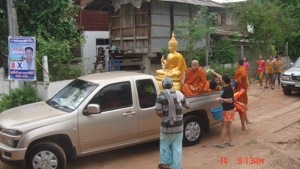
Soaking up the local culture in small village in north east Thailand is most probably best achieved during local community events. One of the more notable of these would have to be Songkran.

What historically started out as well wishing ritual and a passing on of good luck has transformed into a nationwide, three to five day water fight.

20140415-121929.jpg

20140416-071129.jpg

What is not always obvious is how this event calls on local community members to help maintain a certain order. Now, the demands placed on theses certain individuals can’t be too onerous so as to not enjoy the festivities. The local constabulary will don colorful “Songkran” shirts and infiltrate the throng of revellers.

One such individual was a definite standout though and had to juggle the functions he was prevailed upon to perform. Hmmmm…… What to do, do I squirt the passers by with my water cannon or do I direct on coming traffic?

20140416-065900.jpg

All I can report is that there were no traffic accidents and definitely a huge number of soaked locals.